
15. NVMe-oF Storage Target on OCTEON#
15.1. Introduction#
Storage is increasingly disaggregated from compute: NVMe SSDs are pooled behind storage nodes and served to remote machines over the network, rather than sitting inside each server. NVMe over Fabrics (NVMe-oF) is the protocol that makes this practical.
An NVMe-oF target exports NVMe storage namespaces across a network so that a remote NVMe-oF initiator can use them as if they were local NVMe drives. When the fabric is RDMA (RoCEv2), data moves with zero-copy, low-latency transfers that keep CPU overhead low.
This guide walks you through bringing up an NVMe-oF storage target on Marvell OCTEON, end to end.
An SPDK NVMe-oF target runs on OCTEON, reached by a remote NVMe-oF initiator over a RoCEv2
link: the OCTEON RDMA transport is provided by the DAO dao-rdma_graph application and the OCTEON
RDMA provider, and the storage protocol is served by SPDK nvmf_tgt.
Note
This guide covers NVMe-oF over the RDMA (RoCEv2) transport throughout. NVMe-oF can also run over other transports such as TCP, which are outside the scope of this guide.
15.2. Solution Components#
The following diagram shows the end-to-end topology.
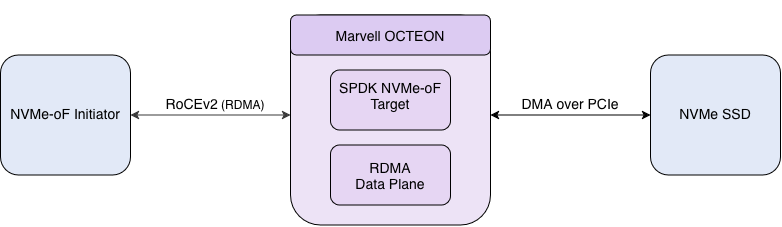
End-to-end topology: an NVMe-oF initiator connected to an OCTEON target over a RoCEv2 link.#
The solution is made of the following components:
dao-rdma_graph– the DPDK-based DAO application that runs the RoCEv2 data plane on OCTEON (RPM + DPI resources, worker cores feeding the RDMA graph nodes).octep-rdma.ko– the OCTEON RDMA kernel module.OCTEON userspace RDMA provider –
liboctep_rp-rdmav34.so(the rdma-coreoctep_rpprovider), plus thelibibverbs/librdmacmandibv_*utilities that let userspace applications see theoctep_rdma_0device.SPDK
nvmf_tgt– the stock SPDK NVMe-oF target that terminates the NVMe-oF protocol on OCTEON and exports one or more namespaces.NVMe-oF initiator – a standard NVMe-oF/RDMA initiator that drives the target. SPDK ships a suite of NVMe example and benchmarking applications (such as
spdk_nvme_identifyandspdk_nvme_perf) that this guide uses.
15.3. Architecture#
The following diagram shows the components of the OCTEON NVMe-oF target.
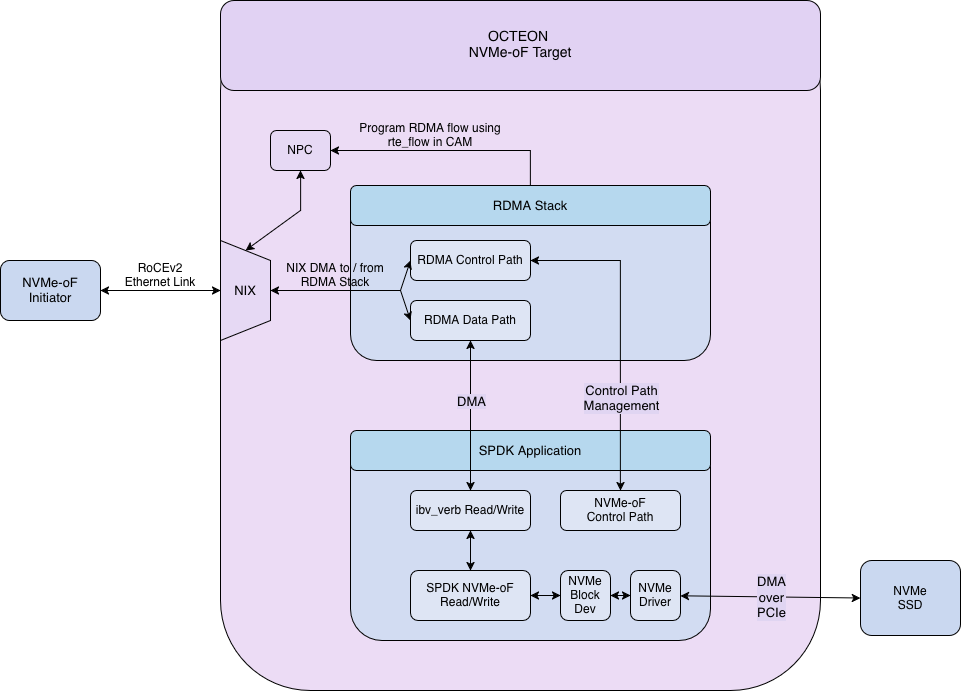
Components of the OCTEON NVMe-oF target: the DAO RDMA data plane feeds the SPDK NVMe-oF target.#
The NVMe-oF initiator opens an RDMA connection to the OCTEON target over a RoCEv2 link. On OCTEON,
dao-rdma_graph owns the RoCEv2 data plane and presents an RDMA device (octep_rdma_0) to
userspace through the OCTEON RDMA provider. The SPDK nvmf_tgt binds to that device, listens on an RDMA
port, and serves NVMe commands.
NVMe I/O queues map one-to-one onto RDMA queue pairs. The NVMe-oF initiator submits NVMe commands over the network using the NVMe-oF protocol, and they are carried to the target over the RoCEv2 transport. The target executes them against the underlying block device and returns the data and completions over RDMA to the initiator.
15.4. Prerequisites#
15.4.1. Hardware#
A Marvell OCTEON CN10K platform with a 100 GbE port for the data path.
An NVMe-oF initiator system with a RoCEv2-capable RDMA NIC.
A 100 GbE link between the OCTEON data port and the initiator RDMA NIC.
15.4.2. Software#
Component versions used in this guide: DPDK
25.11, DAOnvmeof-dao-release, SPDKv26.01, marvell-rdma-corenvmeof-rdma-core-release, and the ARM GNU toolchainaarch64-none-linux-gnu 14.2for cross-compiling the OCTEON RDMA data plane (dao-rdma_graphandoctep-rdma.ko). SPDK (nvmf_tgtand the initiator tools) is built natively.
Note
The dao sources are maintained on the nvmeof-dao-release branch and the
marvell-rdma-core sources on the nvmeof-rdma-core-release branch.
Please build with sources from these release branches.
Note
This guide assumes the OCTEON already boots the Marvell Linux 6.6 kernel (6.6.46) with Ubuntu 24.04. See Compiling Linux kernel from sources for building and deploying the OCTEON kernel (use the linux-6.6.x-release branch).
15.4.3. System configuration#
Hugepages mounted on both OCTEON and the NVMe-oF initiator.
The OCTEON data interface configured with MTU 9000.
CPU isolation on OCTEON (
isolcpus=domain,managed_irq,16-23 nohz_full=16-23 rcu_nocbs=16-23 irqaffinity=0-15), so the RDMA graph (dao-rdma_graph) and the target (nvmf_tgt) run on dedicated cores.
The exact commands to apply these prerequisites are provided in the Environment Setup section and the per-step instructions below.
Note
The OCTEON coremasks must lie within the
isolcpusrange and must not overlap each other.The RDMA graph (
dao-rdma_graph -c) and the target (nvmf_tgt -m) run on separate isolated cores: in this guide the target (nvmf_tgt) uses-m 0x10000(core 16) and the graph (dao-rdma_graph) uses-c 0x3C0000(cores 18–21), all inside the isolated range 16–23.
Note
Throughout this guide, the OCTEON data port uses the example address
192.168.1.80/24and the initiator uses192.168.1.40/24.The target subsystem is
nqn.2016-06.io.spdk:cnode1on RDMA port4420.Three per-machine directory placeholders are used:
<dao>is the DAO source tree on the x86 build host (afterninja -C buildthe artifacts are under<dao>/build/and<dao>/subprojects/rdma-core/build/).<octeon-dir>is the directory on the OCTEON target that holds the deployeddao-rdma_graph,octep-rdma.ko, the RDMA-core provider (rdma-core/) and the natively-built SPDK (spdk/).<initiator-dir>is the directory on the NVMe-oF initiator that holds the natively-built SPDK (spdk/).
Substitute the addresses, device names and file paths for your own environment.
15.5. Building the Components#
15.5.1. DAO data plane#
Build dao-rdma_graph and the octep-rdma.ko kernel module by cross-compiling on an x86 host,
then copy both artifacts to the OCTEON (see Deploying the artifacts below):
RDMA Solution – Octeon RDMA Termination Mode -> Steps to Compile DAO builds, in a single step:
Firmware:      dao-rdma_graph
Kernel module: octep-rdma.ko
rdma-core:     libibverbs, librdmacm, provider
RDMA Solution checks out DAO from
dao-devel; for this guide, check out the validatednvmeof-dao-releasebranch instead.Compiling DAO from sources – the general DAO/DPDK cross-compilation, toolchain and meson-option reference that the recipe above builds on.
Note
Use the RDMA Solution guide for building the data plane.
The runtime bring-up (hugepages, DPI/RPM VFs, and launching the graph with
--enable-termination) is covered by Environment Setup and Setting up the OCTEON Target below, which reference RDMA Solution’s Octeon RDMA Termination Mode for the DPI/RPM VF details.RDMA Solution uses different sample addresses (for example
30.0.0.x) whereas this guide uses192.168.1.80/192.168.1.40– keep one addressing scheme consistent across both guides.
15.5.2. Building the NVMe-oF SPDK target on OCTEON#
Build the SPDK NVMe-oF target natively. SPDK uses its own bundled DPDK submodule, and RDMA support must be enabled explicitly.
# Native compilation on the OCTEON
cd <octeon-dir>
git clone https://github.com/spdk/spdk.git
cd spdk
git checkout v26.01
git submodule update --init
./scripts/pkgdep.sh
./configure --with-rdma
make -j"$(nproc)"
Verify:
build/bin/nvmf_tgt --version # SPDK v26.01
15.5.3. Building SPDK initiator tools on NVMe-oF Initiator System#
Build the same SPDK release natively on the NVMe-oF initiator system so it links the initiator NIC’s inbox RDMA stack.
# on the NVMe-oF initiator system
cd <initiator-dir>
git clone https://github.com/spdk/spdk.git
cd spdk
git checkout v26.01
git submodule update --init
./scripts/pkgdep.sh
./configure --with-rdma
make -j"$(nproc)"
Verify:
ls -l build/bin/spdk_nvme_identify build/bin/spdk_nvme_perf
15.5.4. Deploying the artifacts#
On the x86 build host, the ninja -C build step (see RDMA Solution) produces, under <dao>:
Firmware:      build/app/dao-rdma_graph
Kernel module: build/kmod/rdma/octep_rdma/octep-rdma.ko
rdma-core:     subprojects/rdma-core/build/{lib,bin} (libibverbs, librdmacm, provider, ibv_* tools)
Copy the firmware and kernel module to <octeon-dir> and the RDMA-core provider to
<octeon-dir>/rdma-core on the OCTEON. Use rsync -a for the provider so the .so symlinks
are preserved:
# on the x86 build host, from <dao>:
scp   build/app/dao-rdma_graph                 <octeon>:<octeon-dir>/
scp   build/kmod/rdma/octep_rdma/octep-rdma.ko <octeon>:<octeon-dir>/
rsync -a subprojects/rdma-core/build/lib \
         subprojects/rdma-core/build/bin       <octeon>:<octeon-dir>/rdma-core/
Verify the provider on the OCTEON and export the provider path – the target’s LD_LIBRARY_PATH
points at it:
ls -l <octeon-dir>/rdma-core/lib/liboctep_rp-rdmav34.so \
      <octeon-dir>/rdma-core/lib/libibverbs.so* \
      <octeon-dir>/rdma-core/lib/librdmacm.so*
export PROVIDER=<octeon-dir>/rdma-core
15.6. Environment Setup#
On OCTEON, perform the following as described in the RDMA Solution guide:
Configure Hugepages and VFIO
Configure DPI and Bind VFs
Create and Bind RPM VFs
15.7. Setting up the OCTEON Target#
Run the following three components in the same order: the RDMA graph (dao-rdma_graph), the SPDK
target (nvmf_tgt), and the RPC configuration that sets up NVMe-RDMA on the target.
15.7.1. Step 1 – launch the RDMA data plane#
The DPI and RPM VFs were created and bound to vfio-pci in Environment Setup (per the
RDMA Solution guide). Confirm the graph’s data-port VF (0002:03:00.1 in this example) is bound, then load
the module and launch the graph:
dpdk-devbind.py --status | grep 0002:03:00.1
# Load RDMA Kernel Modules
modprobe ib_uverbs
insmod <octeon-dir>/octep-rdma.ko
<octeon-dir>/dao-rdma_graph -c 0x3C0000 \
  -a 0000:06:00.2 -a 0000:06:00.3 -a 0000:06:00.4 -a 0000:06:00.5 \
  -a 0000:06:00.6 -a 0000:06:00.7 -a 0000:06:01.0 -a 0000:06:01.1 \
  -a 0000:06:01.2 -a 0000:06:01.3 -a 0000:06:01.4 -a 0000:06:01.5 \
  -a 0000:06:01.6 -a 0000:06:01.7 -a 0002:03:00.1 \
  --file-prefix=ep -- -p 0x1 --max-pkt-len=9600 -P -n 1 -r 0x1 \
  --num-mbufs 524288 --enable-termination
The device (PCIe) addresses and the coremask (-c 0x3C0000 = cores 18–21) are examples, use the
correct values for your platform. A healthy start prints:
Port 0 Link up at 100 Gbps
Port 0 is RDMA_PORT_ST_UP
QP 1023 configured as management QP
Leave the graph (dao-rdma_graph) running.
Note
For details on inserting octep-rdma.ko and running dao-rdma_graph, refer to the
RDMA Solution guide.
15.7.2. Step 2 – configure the data interface and start the target#
Note
Before assigning the IP address, run
dmesg -wand confirm that the expected data interface (for exampleenp6s0v22) has been detected.After assigning the address, verify that the interface is reachable from the NVMe-oF initiator with
ping.
ifconfig enp6s0v22 192.168.1.80/24 up
ip link set enp6s0v22 mtu 9000

export LD_LIBRARY_PATH=$PROVIDER/lib:$LD_LIBRARY_PATH
$PROVIDER/bin/ibv_devices        # confirm octep_rdma_0 is listed before starting the target
<octeon-dir>/spdk/build/bin/nvmf_tgt -m 0x10000 -r /var/tmp/spdk.sock
A healthy start prints:
Reactor started on core 16
Leave the target (nvmf_tgt) running.
Note
Ensure the OCTEON RDMA firmware is fully up (Step 1) before starting
nvmf_tgt.Export the provider
LD_LIBRARY_PATHin the same shell that launchesnvmf_tgt– otherwise it cannot seeoctep_rdma_0.
15.7.3. Step 3 – configure the target over RPC#
For simplicity of setup and testing, the commands below use a NULL block device (Null0) as
the backing store. Although the topology diagram above shows an NVMe SSD, the same steps apply to
any SPDK block device. Please substitute any SPDK bdev such as an NVMe bdev , a ramdisk , or
another bdev type. Replace the bdev_null_create command below with the appropriate bdev
creation command, and pass the resulting bdev name to nvmf_subsystem_add_ns.
Create the RDMA transport, the block device, a subsystem with one namespace, and an RDMA listener:
RPC=<octeon-dir>/spdk/scripts/rpc.py

$RPC nvmf_create_transport -t rdma --num-shared-buffers 1024 --io-unit-size 65536 \
  --max-queue-depth 16 --max-io-size 131072 --in-capsule-data-size 4096 \
  --max-io-qpairs-per-ctrlr 128 --num-cqe 32767 --no-srq

$RPC bdev_null_create Null0 262144 4096

$RPC nvmf_create_subsystem nqn.2016-06.io.spdk:cnode1 -a \
  -s SPDK00000000000001 -d SPDK_Controller1
$RPC nvmf_subsystem_add_ns nqn.2016-06.io.spdk:cnode1 Null0
$RPC nvmf_subsystem_add_listener nqn.2016-06.io.spdk:cnode1 \
  -t rdma -a 192.168.1.80 -s 4420

$RPC nvmf_get_transports
$RPC nvmf_get_subsystems
Once the transport and listener are created, the nvmf_tgt output prints:
Create IB device octep_rdma_0 ... succeed
NVMe/RDMA Target Listening on 192.168.1.80 port 4420
15.8. Setting up the NVMe-oF Initiator#
Confirm the NVMe-oF initiator RDMA device and its RoCEv2 GID index, then bring up the data interface:
ibv_devices
ibv_devinfo -v            # note the device name and the RoCEv2 (v2) gid-index
ifconfig enp4s0f0np0 192.168.1.40/24 up
ip link set enp4s0f0np0 mtu 9000

# the SPDK initiator tools need hugepages
mkdir -p /dev/huge
mount -t hugetlbfs nodev /dev/huge
echo 1024 > /sys/kernel/mm/hugepages/hugepages-2048kB/nr_hugepages
15.9. Functional Testing#
Connectivity is confirmed when spdk_nvme_identify returns the controller and namespace.
<initiator-dir>/spdk/build/bin/spdk_nvme_identify \
  -r "trtype:RDMA adrfam:IPv4 traddr:192.168.1.80 trsvcid:4420 subnqn:nqn.2016-06.io.spdk:cnode1"
A successful run prints the controller identify data (controller model, namespace size, NQN).
15.10. Performance Testing#
spdk_nvme_perf drives the target directly from the NVMe-oF initiator. Its main options are:
-q– queue depth-o– payload size in bytes (4096= 4 KB,65536= 64 KB)-w– workload (read,write,randread,randwrite)-t– test duration in seconds-c– core mask-P– number of RDMA queue pairs per controller
15.10.1. Baseline (single core, single queue pair)#
R='trtype:RDMA adrfam:IPv4 traddr:192.168.1.80 trsvcid:4420 subnqn:nqn.2016-06.io.spdk:cnode1'

# single baseline run: 4 KB read, queue depth 16, one core, one queue pair
<initiator-dir>/spdk/build/bin/spdk_nvme_perf -r "$R" -q 16 -o 4096 -w read -t 10 -c 0x1 -P 1
15.10.2. Multi-core, multi-queue-pair testing#
Throughput scales by adding cores (-c) and queue pairs (-P) together:
R='trtype:RDMA adrfam:IPv4 traddr:192.168.1.80 trsvcid:4420 subnqn:nqn.2016-06.io.spdk:cnode1'
for cP in "0x1 1" "0x3 2" "0x7 3" "0xF 4"; do set -- $cP; c=$1; P=$2;
  echo "===== 64K READ cores=$c qpairs=$P q=16 =====";
  <initiator-dir>/spdk/build/bin/spdk_nvme_perf -r "$R" -q 16 -o 65536 -w read -t 10 -c $c -P $P;
done
spdk_nvme_perf reports IOPS, bandwidth (MiB/s) and average/percentile latency.
15.11. Limitations#
15.11.2. Maximum NVMe queue depth of 16#
--max-queue-depth on the RDMA transport is supported up to 16 only.
Fix: Set --max-queue-depth 16 (or lower) and align the initiator queue depth.
Impact: Values above 16 may cause transport creation to fail or lead to unstable I/O.
$RPC nvmf_create_transport -t rdma ... --max-queue-depth 16 --no-srq
<initiator-dir>/spdk/build/bin/spdk_nvme_perf -r "$R" -q 16 -P 1 -o 65536 -w read -t 10 -c 0x1
15.12. Troubleshooting#
Work through these checks in order: environment setup → dao-rdma_graph → nvmf_tgt → RPC → initiator.
15.12.1. Reset to a clean slate#
To restart the target cleanly, stop nvmf_tgt and remove its control socket before relaunching:
pkill -INT -f nvmf_tgt; sleep 2; pkill -KILL -f nvmf_tgt 2>/dev/null
rm -f /var/tmp/spdk.sock
To also return the data plane to a clean state, stop dao-rdma_graph and re-run the bring-up in
RDMA Solution. A reboot is the simplest way to fully reset the graph, the octep-rdma module, and
hugepages.
15.12.2. Bring-up order#
Set kernel boot params (
isolcpus,nohz_full,rcu_nocbs,irqaffinity) and bind DPI/RPM VFs tovfio-pcibefore starting the graph (dao-rdma_graph).Start in order:
dao-rdma_graph→nvmf_tgt→ RPC config. Do not overlap thedao-rdma_graphandnvmf_tgtcoremasks.
15.12.3. dao-rdma_graph fails or port down#
Confirm PCIe BDFs with
lspci/dpdk-devbind.py --status.Include
--enable-termination(required for OCTEON NVMe-oF target).Check log for
Port 0 Link up at 100 GbpsandQP 1023 configured as management QP.
15.12.4. octep_rdma_0 not found#
Load modules:
modprobe ib_uverbsandinsmod <octeon-dir>/octep-rdma.ko.Export the provider path in the same shell as
nvmf_tgt, then confirm the device is visible (PROVIDER=<octeon-dir>/rdma-core):export LD_LIBRARY_PATH=$PROVIDER/lib:$LD_LIBRARY_PATH $PROVIDER/bin/ibv_devices
15.12.5. nvmf_tgt / RPC fails#
Keep
nvmf_tgtrunning; confirm/var/tmp/spdk.sockexists.Create resources in order: transport → block device → subsystem → namespace → listener.
Verify with
nvmf_get_subsystems(listener must match OCTEON IP, e.g.192.168.1.80:4420).
15.12.6. Initiator cannot connect#
Set the initiator IP on the same subnet as the OCTEON target.
Prefer MTU 9000 on both OCTEON and initiator data interfaces. If connectivity fails due to a setup issue (switch/NIC not configured for jumbo frames), fall back to the default MTU 1500 on both ends and retest.
Run
ping <octeon-ip>beforespdk_nvme_identify.Match
traddr,trsvcid, andsubnqnto the target listener.
See also RDMA Solution for general RDMA/GID/VF binding issues.