
14. RDMA Solution#
14.1. RDMA Overview#
Remote Direct Memory Access (RDMA) enables zero-copy data transfer between memory regions of two systems without CPU involvement in the data path. This significantly reduces latency and CPU overhead, making RDMA ideal for high-performance networking.
RoCE v2 (RDMA over Converged Ethernet v2) encapsulates RDMA traffic over UDP/IP, allowing it to be routable across Layer 3 networks.
RDMA solution comprises multiple software components working together: on the x86 host, the rdma-core user-space libraries and kernel modules provide RDMA verbs and core functionality, while on the Octeon CN10K, a DPDK-based firmware application maintains RDMA resource contexts and performs RoCEv2 encapsulation for high-performance data transfer
14.2. RDMA Operation Modes#
OCTEON RDMA can operate in two modes:
Endpoint Mode: the OCTEON acts as an RDMA adapter (NIC) for the x86 host, which terminates the RDMA endpoint. This mode is described in the Octeon RDMA End Point Mode subsection below.
Termination mode: the OCTEON terminates the RDMA endpoint locally instead of passing RDMA traffic through to the host. This mode is described in the Octeon RDMA Termination Mode subsection below.
14.2.1. Octeon RDMA End Point Mode#
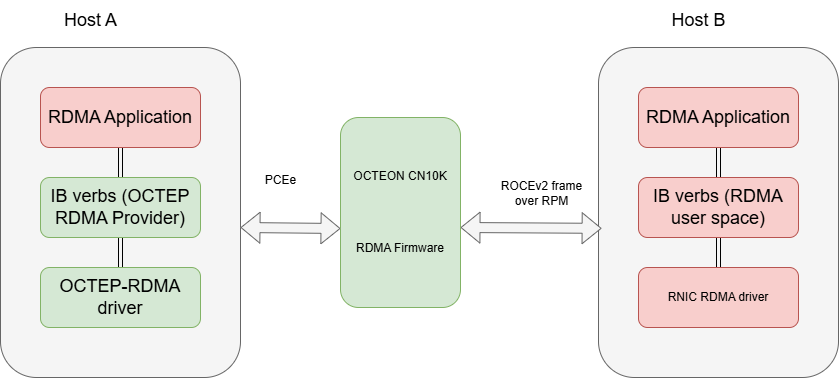
dao-rdma_graph (referred to here as rdma) is a DPDK based application
that exercises RDMA (RoCEv2/IB verbs) dataplane paths on OCTEON and host
platforms. It supports multi-queue (multi-QP) UD and RC transports,
multi-device scenarios (multiple RDMA interfaces), and validation via
standard rdma-core utilities (ibv_*) and RDMA perftests utilities.
The application configures required RPM/DPI resources on OCTEON, launches
workers to process Ethernet receive nodes feeding RDMA graph nodes, and allows
users to run verbs test programs (ibv_ud_pingpong, ibv_rdma_mq_trf)
across host <-> OCTEON or multi-device setups. Non-RDMA host stack traffic
(ARP, ICMP, RDMA CM) is handled through a management QP ring-based netdev
using BAR4 doorbells and DMA passthrough, eliminating the previous SDP
dependency.
14.2.1.1. Features#
DPDK based RDMA dataplane orchestration on OCTEON (RPM + DPI VFs)
Management QP ring-based netdev for non-RDMA host traffic (ARP, ICMP, RDMA CM)
Supports UD transport ping/pong validation (
ibv_ud_pingpong)Supports multi-queue UD and RC tests (
ibv_rdma_mq_trf)Multi-device RDMA support (multiple RDMA VF devices)
Works with host-side
rdma-coreutilities for probing & statsVFIO-PCI binding for RPM/DPI devices
Programmable number of Queue Pairs (QPs) per test
Command-line options for selecting device masks, number of RDMA devices, etc.
Integrates with perftest utilities (
ib_send_lat,ib_send_bw,ib_write_lat,ib_write_bw,ib_read_lat,ib_read_bw) for latency & bandwidth benchmarkingSupports high-performance RDMA memory allocations and multi-QP resource scaling
14.2.1.2. Setting up Environment#
Bind RPM device to vfio-pci:
dpdk-devbind.py -b vfio-pci 0002:02:00.0
14.2.1.2.1. Obtain DAO sources and checkout DAO 26.02 branch#
git clone https://github.com/MarvellEmbeddedProcessors/dao.git
cd dao
git checkout dao-26.02
14.2.1.2.2. Enable and bind DPI/NPA devices (helper script)#
The dpi-test-setup.sh helper configures DPI VFs and related devices for the
RDMA dataplane. It is supplied with the DAO/OCTEON SDK deliverable for your
platform (some images install it as /usr/bin/dpi-test-setup.sh). After
cloning the repository (Obtain DAO sources and checkout DAO 26.02 branch), you can also run a copy from
your DAO checkout if your release ships it under scripts/ or similar.
The reference implementation discovers the DPI PF via lspci -d 177d:a080,
creates VFs, binds DPI VFs (177d:a081) and an NPA PF (177d:a0fb) to
vfio-pci, and mounts hugepages. Adjust NUM_DPI / NUMVFS inside the
script if your board differs.
Run the packaged script when available:
dpi-test-setup.sh
If you do not have dpi-test-setup.sh on the system, save the following as
dpi-test-setup.sh (make it executable), or paste it into a root shell. It
matches the reference script bundled on typical Marvell OCTEON images:
# Copyright (c) 2020 Marvell.
# SPDX-License-Identifier: BSD-3-Clause

# Set to 2 to use two DPI blocks when present (e.g. on 98xx).
NUM_DPI=1

# Enable DPI VFs
NUMVFS=12
DPIPF=$(lspci -d 177d:a080|awk '{print $1}' | head -${NUM_DPI})
echo "###### DPI PFs ######"
echo "$DPIPF"

mkdir -p /dev/huge
mount -t hugetlbfs nodev /dev/huge
echo 12 > /sys/kernel/mm/hugepages/hugepages-524288kB/nr_hugepages

echo -e "\n"
echo "Creating DPI VFs ..."
for PF in $DPIPF
do
        DPIVFS=$(cat /sys/bus/pci/devices/$PF/sriov_numvfs)
        echo "Current number of VFs under DPIPF $PF = $DPIVFS"
        if [ "x$DPIVFS" != x"$NUMVFS" ]; then
                TOTALVFS=$(cat /sys/bus/pci/devices/$PF/sriov_totalvfs)
                if [ $TOTALVFS -lt $NUMVFS ]; then
                        NUMVFS=$TOTALVFS
                fi

                echo "Creating $NUMVFS VFs for DPIPF $PF ..."
                echo 0 > /sys/bus/pci/devices/$PF/sriov_numvfs
                echo $NUMVFS > /sys/bus/pci/devices/$PF/sriov_numvfs
                if [ x"$?" != "x0" ]; then
                        echo -n \
        """Failed to enable $DPI DMA queues.
        """ >&2
                exit 1
        fi
        fi
done

# Bind only required NPA and DPI VFs to vfio-pci
DPIVF=$(lspci -d 177d:a081|awk '{print $1}')
echo -e "\n"
echo "###### DPI VFs ######"
echo "$DPIVF"

NPAPF=$(lspci -d 177d:a0fb|awk '{print $1}'|head -1)
echo -e "\n"
echo "Using NPA PF $NPAPF ..."

dpi_devs=(${DPIVF} $NPAPF)

for DEV in ${dpi_devs[*]}; do
        if [ -e /sys/bus/pci/devices/$DEV/driver/unbind ]; then
                drv="$(readlink -f /sys/bus/pci/devices/$DEV/driver)"
                drv="$(basename $drv)"
                if [ "$drv" != "vfio-pci" ]; then
                        echo $DEV > "/sys/bus/pci/devices/$DEV/driver/unbind"
                fi
        fi
        echo vfio-pci > "/sys/bus/pci/devices/$DEV/driver_override"
        echo $DEV > /sys/bus/pci/drivers_probe
        echo "  Device $DEV moved to VFIO-PCI"
done
If you perform only manual vfio-pci binding without running the script
above, configure hugepages separately on the OCTEON:
mkdir -p /dev/huge
mount -t hugetlbfs nodev /dev/huge
echo 12 > /sys/kernel/mm/hugepages/hugepages-524288kB/nr_hugepages
14.2.1.2.3. Cross Compile for ARM64:#
Follow: https://marvellembeddedprocessors.github.io/dao/guides/gsg/build.html#compiling-and-installing
14.2.1.3. Launching RDMA Application on OCTEON#
Export DPI device list and run application:
export DPI_DEV="-a 0000:06:00.1 -a 0000:06:00.2 -a 0000:06:00.3 -a 0000:06:00.4 -a 0000:06:00.5 -a 0000:06:00.6 \
-a 0000:06:00.7 -a 0000:06:01.0 -a 0000:06:01.1 -a 0000:06:01.2 -a 0000:06:01.3 -a 0000:06:01.4 -a 0000:06:01.5"
scp dao-rdma_graph root@OCTEON_IP:/root/
/root/dao-rdma_graph -c 0xf -a 0002:02:00.0 $DPI_DEV --file-prefix=ep -- -p 0x1 -P --max-pkt-len=9600 -n 1 -r 0x1 --num-mbufs 1048576
Sample boot log excerpt:
[lcore -1] DAO_INFO: RDMA application version 25.01.0-24.11.0-d6645f1
EAL: Detected CPU lcores: 24
...
[lcore   0] DAO_INFO: Port 0 Link up at 100 Gbps FDX Fixed
[lcore   0] DAO_INFO: Setting up 8 VFs for PEM0
[lcore   0] DAO_INFO: graph node: rdma_eth_rx-0-0
[lcore   0] DAO_INFO: graph node: rdma_eth_rx-0-1
[lcore   0] DAO_INFO: Launching worker loops....
Note
Ensure that the Octeon CN10K firmware is fully initialized and running before configuring the RDMA software components on the host.
14.2.1.4. Host Setup Environment#
The host initiates RDMA communication using the RDMA verbs API provided by rdma-core.
14.2.1.4.1. a. User Space#
Application: Uses RDMA verbs (e.g., ibv_post_send, ibv_post_recv) through libibverbs.
rdma-core: Provides libraries and utilities for RDMA (e.g., libibverbs, libmlx5, etc.).
Includes vendor-specific provider implementation (e.g., Mellanox, Broadcom, Marvell CNXK). Provider translates generic verbs into hardware-specific operations.
14.2.1.4.2. b. Kernel Space#
ib_core: RDMA core kernel module providing common RDMA infrastructure.
Vendor-specific kernel driver: Implements low-level hardware interaction for the RDMA adaptor.
Handles Queue Pairs (QPs), Completion Queues (CQs), memory registration, and DMA mapping.
14.2.1.4.3. Setting up Environment#
Configure the required host kernel bootargs by updating the
GRUB_CMDLINE_LINUX line in /etc/default/grub. aw_bits=39 is required
on all hosts; on Intel hosts also enable the IOMMU with
iommu=on intel_iommu=on (these two are Intel specific).
On an Intel host:
GRUB_CMDLINE_LINUX="iommu=on intel_iommu=on aw_bits=39"
On a non-Intel host:
GRUB_CMDLINE_LINUX="aw_bits=39"
Regenerate the GRUB configuration and reboot for the changes to take effect
(for example, update-grub on Debian/Ubuntu or grub2-mkconfig on
RHEL-based systems).
Clone DAO sources for host kernel driver:
git clone https://github.com/MarvellEmbeddedProcessors/dao.git
cd dao
git checkout dao-26.02
Build DAO for x86 host
rdma-core is defined as a subproject, kernel header updates and its compilation
will be handled with following instructions.
Note
pciutils (which provides lspci) is required on the machine where the
sources are compiled. Install it before building:
sudo apt install pciutils
Note
Meson version 1.8.0 or higher is mandatory for RDMA host build.
Update meson version on host to >= 1.8.0 using following command:
pip3 install meson==1.8.0
export KERNEL_BUILD_DIR=/usr/src/linux-headers-`uname -r`/
meson setup build -Dkernel_dir=${KERNEL_BUILD_DIR} -Drdma_build=true
ninja -C build
# Module at build/kmod/rdma/octep_rdma/octep-rdma.ko
# ibv CLIs at ./subprojects/rdma-core/build/bin/
Insert module & dependencies (ensure Octeon FW running):
modprobe ib_uverbs
insmod build/kmod/rdma/octep_rdma/octep-rdma.ko
lspci | grep Cav
echo 1 > /sys/bus/pci/devices/0000\:01\:00.0/sriov_numvfs
Validate device probing:
./subprojects/rdma-core/build/bin/ibv_devices
./subprojects/rdma-core/build/bin/ibv_devinfo
Bring up host interface:
ifconfig enp1s0 30.0.0.3 up
Partner Machine Setup (MLX example):
/etc/init.d/openibd restart
ifconfig enp6s0f1np1 30.0.0.11
ping 30.0.0.3
rdma link show
ibv_devices
ibv_devinfo
14.2.2. Octeon RDMA Termination Mode#
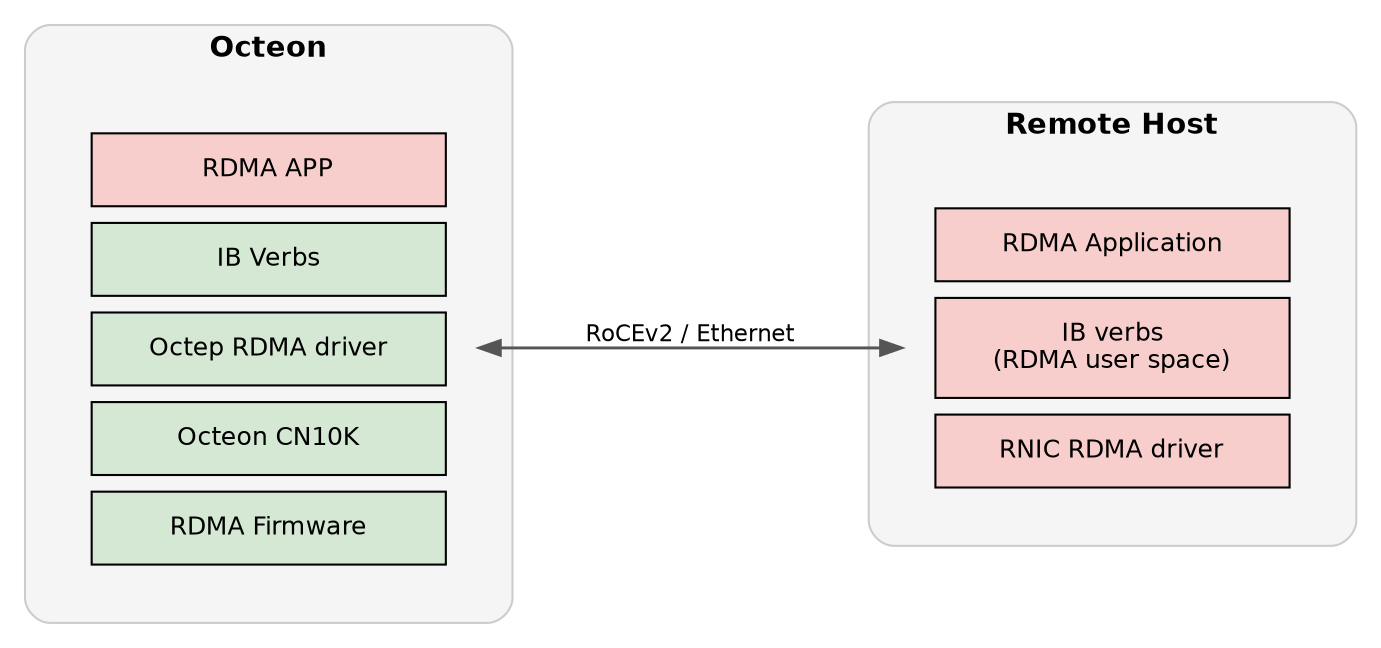
In termination mode the OCTEON terminates the RDMA endpoint locally instead of
passing RDMA traffic through to the host. It is enabled by launching
dao-rdma_graph with the --enable-termination option; the periodic
heartbeat is disabled in this mode.
Required versions:
DPDK 25.11 or newer.
DAO
dao-devel(tip-of-tree); this mode is not yet part of a release branch.OCTEON kernel Marvell Linux 6.6, built from MarvellEmbeddedProcessors/linux-marvell.
Note
The OCTEON must run the Marvell Linux 6.6 kernel
(MarvellEmbeddedProcessors/linux-marvell), which provides the
octeontx2_dpi module parameters used during setup.
14.2.2.1. Steps to Compile DAO#
Build on an x86 host and copy the resulting binaries to the OCTEON DUT. The
-Drdma_build=true option enables a unified cross-compilation that builds
rdma-core (libibverbs, librdmacm, octep_rdma provider), the octep_rdma
kernel module (with -DCONFIG_OCTEP_RDMA_OCTTERM for termination mode), and
dao-rdma_graph in a single step. <linux-6.6-kernel-path> must point to
the OCTEON Linux 6.6 kernel source tree.
Note
Meson version 1.8.0 or higher is required for the RDMA cross-compilation.
pip3 install meson==1.8.0
# Compile and install DPDK 25.11 (or newer), then point pkg-config at it
export PKG_CONFIG_PATH=<dpdk-install-dir>/lib/pkgconfig

# Obtain DAO sources (tip-of-tree; termination mode is not on a release branch)
git clone https://github.com/MarvellEmbeddedProcessors/dao.git
cd dao
git checkout dao-devel

# Cross-compile DAO with rdma-core, octep_rdma kmod and dao-rdma_graph
meson setup build --cross=config/arm64_cn10k_linux_gcc --prefer-static  \
  -Drdma_build=true -Dkernel_dir=<linux-6.6-kernel-path>
ninja -C build

# Build artifacts:
#   Firmware:      build/app/dao-rdma_graph
#   Kernel module: build/kmod/rdma/octep_rdma/octep-rdma.ko
#   rdma-core:     subprojects/rdma-core/build/lib/ (libibverbs, librdmacm, provider)

# Copy firmware, kmod and rdma-core libraries to the DUT
The following steps are performed on the OCTEON DUT.
14.2.2.2. Configure Hugepages and VFIO#
mkdir -p /mnt/huge
mount -t hugetlbfs nodev /mnt/huge
modprobe vfio-pci
echo 36 > /proc/sys/vm/nr_hugepages
14.2.2.3. Configure DPI and Bind VFs#
Discover the DPI PF, tune the octeontx2_dpi module parameters, create DPI
VFs, and bind them to vfio-pci. Leave at least one VF unbound so the kernel
can take it up and create a netdev:
DPI_PF=$(lspci -d :a080 | awk '{print $1}')

echo 0x10101010 > /sys/module/octeontx2_dpi/parameters/eng_fifo_buf
echo 512 > /sys/module/octeontx2_dpi/parameters/mrrs
echo 256 > /sys/module/octeontx2_dpi/parameters/mps

echo 32 > /sys/bus/pci/devices/$DPI_PF/sriov_numvfs
# Bind all but at least one VF; the unbound VF lets the kernel create a netdev
DPI_VF=$(lspci -d :a081 | awk '{print $1}' | head -22)
usertools/dpdk-devbind.py -b vfio-pci $DPI_VF
14.2.2.4. Create and Bind RPM VFs#
Create the RPM VFs used for connectivity with the remote machine and bind them
to vfio-pci (adjust the BDFs to match your setup):
echo 3 > /sys/bus/pci/devices/0002:03:00.0/sriov_numvfs
usertools/dpdk-devbind.py -b vfio-pci 0002:03:00.1 0002:03:00.2 0002:03:00.3
14.2.2.5. Load RDMA Kernel Modules#
Load the modules on the OCTEON. This creates the /dev/octterm0 character
device that dao-rdma_graph requires in termination mode:
modprobe ib_uverbs
insmod kmod/rdma/octep_rdma/octep-rdma.ko
14.2.2.6. Launch the Application#
Export the DPI device list and launch dao-rdma_graph with
--enable-termination (adjust the Ethernet BDFs to match your setup):
export DPI_DEV="-a 0000:06:00.2 -a 0000:06:00.3 -a 0000:06:00.4 -a 0000:06:00.5 \
-a 0000:06:00.6 -a 0000:06:00.7 -a 0000:06:01.0 -a 0000:06:01.1 -a 0000:06:01.2 \
-a 0000:06:01.3 -a 0000:06:01.4 -a 0000:06:01.5 -a 0000:06:01.6 -a 0000:06:01.7"
build/app/dao-rdma_graph -c 0x3f $DPI_DEV -a 0002:03:00.1 --file-prefix=ep -- \
-p 0x1 --max-pkt-len=9600 -P -n 1 -r 0x1 --num-mbufs 1048576 \
--enable-termination
14.2.2.7. Bring up the Interface#
Find the VF interface name (format enp6s0vxx, where xx is a number)
using ifconfig, then assign an IP address in the same subnet as the remote
machine:
ifconfig enp6s0v22 30.0.0.3/24 up
14.2.2.8. Run UD Ping-Pong Test#
With the termination VF interface up and addressed in the same subnet as the remote machine (previous step), verify connectivity and run a UD ping-pong test:
ping 30.0.0.11
ibv_ud_pingpong -g 1 -d <device-name> -i 1 30.0.0.11
14.3. Testing#
14.3.1. UD Ping-Pong Test#
Server (partner MLX device):
ibv_ud_pingpong -g 3 -d mlx5_1 -i 1
Client (host with octep driver):
./subprojects/rdma-core/build/bin/ibv_ud_pingpong -g 1 -d octep_rdma_0 -i 1 30.0.0.11
Successful output example (server/client throughput & latency lines retained).
14.3.2. Multi-Queue UD Test (ibv_rdma_mq_trf)#
Clone & build rdma-core (both sides) if not already done. Launch server:
./subprojects/rdma-core/build/bin/ibv_rdma_mq_trf -g 1 -q 1 -s
Flags:
-g <idx>GID index-q <num>Number of QPs (increase to stress multi-queue, e.g.-q 4)-sServer mode
Client example:
./subprojects/rdma-core/build/bin/ibv_rdma_mq_trf -g 1 -q 1 -r 20.20.20.21
14.3.3. Multi-Device RDMA Steps#
Create RPM VFs and bind to VFIO-PCI:
echo 0002:02:00.0 > /sys/bus/pci/drivers/vfio-pci/unbind
echo > /sys/bus/pci/devices/0002:02:00.0/driver_override
echo 0002:02:00.0 > /sys/bus/pci/drivers/rvu_nicpf/bind
echo 3 > /sys/bus/pci/devices/0002:02:00.0/sriov_numvfs
dpdk-devbind.py -b vfio-pci 0002:02:00.1
dpdk-devbind.py -b vfio-pci 0002:02:00.2
dpdk-devbind.py -b vfio-pci 0002:02:00.3
Start application for 3 devices:
dao-rdma_graph -c 0x1f -a 0002:02:00.1 -a 0002:02:00.2 -a 0002:02:00.3 $DPI_DEV --file-prefix=ep -- -p 0x7 -r 0x7 -n 3 -P
-nNumber of RDMA devices-rRDMA devices mask
Insert module & create RDMA VFs on host:
insmod build/kmod/rdma/octep_rdma/octep-rdma.ko
echo 3 > /sys/bus/pci/devices/0000:01:00.0/sriov_numvfs
Verify IB devices:
./subprojects/rdma-core/build/bin/ibv_devices
Configure VF interfaces (examples):
ifconfig enp1s0v0 30.0.0.1
ifconfig enp1s0v1 31.0.0.1
ifconfig enp1s0v2 32.0.0.1
Check GIDs:
./subprojects/rdma-core/build/bin/ibv_devinfo -v
Partner device RPM VFs:
echo 3 > /sys/bus/pci/devices/0002:02:00.0/sriov_numvfs
ifconfig enP2p2s0v0 30.0.0.2
ifconfig enP2p2s0v1 31.0.0.2
ifconfig enP2p2s0v2 32.0.0.2
14.3.3.1. Connectivity validation (ping multiple IPs)#
Perform ICMP pings to each partner VF IP to ensure reachability.
14.3.3.2. Multi-Device UD Ping-Pong Examples#
Partner:
ibv_ud_pingpong -g 1 -d <device-name> -i 1
Host:
./subprojects/rdma-core/build/bin/ibv_ud_pingpong -g 1 -d octep_rdma_1 -i 1 30.0.0.2
14.3.4. Troubleshooting#
If ibv_ud_pingpong shows empty GID (GID ::):
IP likely not configured on interface; assign IP and re-check.
Kernel log may show:
octep_rdma 0000:01:00.0: Invalid MSIX entry 0 for Q-1If IPv6 GID appears unexpectedly, try different
-gindex (e.g.-g 2or-g 1).
14.3.5. Command-Line Scenarios (Multi-QP Application)#
Single Server / Single Client, 1000 QPs, SGE=1
Server:
./subprojects/rdma-core/build/bin/ibv_rdma_mq_trf -q 1000 -t 8
Client UD Mode:
./subprojects/rdma-core/build/bin/ibv_rdma_mq_trf -g <gid-idx> -q 1000 -t 8 -d <device-name> --qp-type UD --op-type SEND -n <iters> <server-ip>
Client RC Examples:
./subprojects/rdma-core/build/bin/ibv_rdma_mq_trf -g <gid-idx> -q 1000 -t 8 -d <device-name> --qp-type RC --op-type SEND -n 10 --size 1024 <server-ip>
./subprojects/rdma-core/build/bin/ibv_rdma_mq_trf -g <gid-idx> -q 1000 -t 8 -d <device-name> --qp-type RC --op-type WRITE -n 10 --size 1024 <server-ip>
./subprojects/rdma-core/build/bin/ibv_rdma_mq_trf -g <gid-idx> -q 1000 -t 8 -d <device-name> --qp-type RC --op-type WRITE_IMM -n 10 --size 1024 <server-ip>
./subprojects/rdma-core/build/bin/ibv_rdma_mq_trf -g <gid-idx> -q 1000 -t 8 -d <device-name> --qp-type RC --op-type READ -n 10 --size 1024 <server-ip>
Single Server / Single Client, 1000 QPs, SGE=2
Server:
./subprojects/rdma-core/build/bin/ibv_rdma_mq_trf -q 1000 -t 8 --nb-sge=2
Client UD Mode:
./subprojects/rdma-core/build/bin/ibv_rdma_mq_trf -g <gid-idx> -q 1000 -t 8 -d <device-name> --qp-type UD --op-type SEND -n <iters> --nb-sge=2 <server-ip>
Client RC Modes (SEND/WRITE/WRITE_IMM/READ) add --nb-sge=2 similarly.
Single Server with 1000 Clients, 1 QP Each, SGE=1
Server:
./subprojects/rdma-core/build/bin/ibv_rdma_mq_trf -q 1 -t 8 -c 1000
Client Loops (example UD):
count=1
while [ $count -le 1000 ]; do
    ./subprojects/rdma-core/build/bin/ibv_rdma_mq_trf -g <gid-idx> -q 1 -t 1 -d <device-name> --qp-type UD --op-type SEND -n <iters> <server-ip>
    ((count++))
done
For RC (SEND/WRITE/WRITE_IMM/READ) run separate loops (example count up to 250 each) as in reference steps.
Single Server with 1000 Clients, 1 QP Each, SGE=2
Server:
./subprojects/rdma-core/build/bin/ibv_rdma_mq_trf -q 1 -t 8 -c 1000 --nb-sge=2
Client UD / RC loops similar to SGE=1 case adding --nb-sge=2.
14.3.6. Performance Testing (Perftest Suite)#
The RDMA application supports standard perftest tools for exercising latency,
bandwidth, and operation-specific performance over both UD and RC transports.
Below are generalized usage patterns using devices like octep_rdma_0
and a partner Mellanox device (e.g. mlx5_1). Adjust GID indices, IPs,
queue counts (-q), iteration counts (-n), and operation modes as
appropriate for your environment.
- General Notes:
Run server side commands (those without a destination IP) on the responder host.
Client side adds destination IP (last argument) to initiate connection.
Use
--gid-index <idx>to select RoCE v2 GID matching configured IP.-c UDselects Unreliable Datagram;-c RCselects Reliable Connected.-Fenables “Formatted” output;--report_gbitsreports throughput in Gbit/s.Increase
-q(number of QPs) to evaluate scalability; increase-nto extend test iterations.For read tests,
-o <order>may select posting order or opcode variant (per perftest help).
14.3.7. Latency Tests (UD / RC):#
Server examples (no destination IP):
ib_send_lat -d octep_rdma_0 -c UD -i 1 --gid-index 1 -F --report_gbits -a
ib_send_lat -d octep_rdma_0 -c RC -i 1 --gid-index 1 -F --report_gbits -a
ib_write_lat -d octep_rdma_0 -c RC -i 1 --gid-index 1 -F --report_gbits -a -n 40
ib_read_lat  -d octep_rdma_0 -c RC -i 1 --gid-index 1 -F --report_gbits -a -o 2
Client counterparts (add server IP):
ib_send_lat  -d octep_rdma_0 -c UD -i 1 --gid-index 1 -F --report_gbits -a 20.10.10.3
ib_send_lat  -d octep_rdma_0 -c RC -i 1 --gid-index 1 -F --report_gbits -a 20.10.10.3
ib_write_lat -d octep_rdma_0 -c RC -i 1 --gid-index 1 -F --report_gbits -a 20.10.10.3 -n 40
ib_read_lat  -d octep_rdma_0 -c RC -i 1 --gid-index 1 -F --report_gbits -a 20.10.10.3 -o 2
ib_read_lat  -d mlx5_1        -c RC -i 1 --gid-index 3 -F -a -o 2 20.10.10.2
14.3.8. Bandwidth Tests (UD / RC SEND, WRITE, READ):#
Server-side examples:
ib_send_bw  -d octep_rdma_0 -c UD -i 1 --gid-index 1 -F --report_gbits -a -n 5 -q 15
ib_send_bw  -d octep_rdma_0 -c RC -i 1 --gid-index 1 -F --report_gbits -a -n 5 -q 2
ib_write_bw -d octep_rdma_0 -c RC -i 1 --gid-index 1 -F --report_gbits -a -n 10 -q 2
ib_read_bw  -d octep_rdma_0 -c RC -i 1 --gid-index 1 -F --report_gbits -a -n 10 -q 2 -o 2
Client examples (add destination IP):
ib_send_bw  -d octep_rdma_0 -c UD -i 1 --gid-index 1 -F --report_gbits -a 20.10.10.3
ib_send_bw  -d octep_rdma_0 -c RC -i 1 --gid-index 1 -F --report_gbits -a -n 5 -q 10 20.10.10.3
ib_write_bw -d octep_rdma_0 -c RC -i 1 --gid-index 1 -F --report_gbits -a -n 10 -q 10 20.10.10.3
ib_write_bw -d mlx5_1       -c RC -i 1 --gid-index 3 -F -a -q 2 -n 10 20.10.10.2
ib_read_bw  -d octep_rdma_0 -c RC -i 1 --gid-index 1 -F --report_gbits -a -n 10 -q 2 -o 2 20.10.10.3
ib_read_bw  -d mlx5_1       -c RC -i 1 --gid-index 3 -F -a -q 2 -n 10 -o 2 20.10.10.2
- Scaling Guidelines:
Increase
-qto test parallel QPs for throughput scaling (e.g. 2, 10, 15).Adjust
-niterations for longer measurement windows (latency stabilization).Use consistent MTU settings across devices (verify with
ibv_devinfo).Ensure GID indices map to the IPv4-mapped RoCE v2 addresses (
::ffff:X.Y.Z.W).Validate link status and speed before benchmarking.
- Memory Allocation Considerations:
Pre-allocate large buffers to avoid page faults during measurement.
Pin hugepages if using user-space memory registration for stable results.
Reuse registered MR across QPs when possible to reduce setup overhead.
- Result Interpretation:
Latency outputs typically include min/avg/max; track jitter when increasing QPs.
Bandwidth tests report Gbit/s; correlate with line rate (e.g. 100G) and packet size.
For WRITE/READ, consider PCIe round-trip and completion queue depth effects.
- Troubleshooting Perftest:
Empty or incorrect GID: re-check IP assignment or use alternate
--gid-index.Low bandwidth: verify flow control settings, MTU, and absence of packet drops (
ethtool -S).Elevated latency spikes: inspect CPU frequency scaling, NUMA placement, and interrupt affinity.
14.4. RDMA Counters#
Note
The telemetry client requires python3-dev and libreadline-dev packages. Install them before use:
sudo apt install python3-dev libreadline-dev
Note
Debug counters require DAO_RDMA_DEBUG to be enabled at build time. Set the
rdma_debug option when configuring the build:
meson setup build -Drdma_debug=true
Most counters are always available; only the counters listed under Debug-Only Counters are gated behind this option.
14.4.1. Connection & Access Overview#
Telemetry connects locally via a Unix domain socket. Remote access is not
supported. Before connecting, make sure the dao-rdma_graph application is
running to enable access to RDMA counter endpoints.
Connect to telemetry:
dpdk-telemetry.py -f ep
Connecting to /var/run/dpdk/ep/dpdk_telemetry.v2
{
  "version": "DPDK 25.11.0",
  "pid": 981,
  "max_output_len": 16384
}
Connected to application: "dao-rdma_graph"
Where ep is the file-prefix used when launching the application.
14.4.2. RDMA Core & Port Overview#
Returns list of enabled lcores and active RDMA ports.
Parameters: None
Endpoint:
/rdma/port/list
Example output:
--> /rdma/port/list
{
  "/rdma/port/list": {
    "rdma_system_info": {
      "core_info": {
        "num_enabled_lcores": 6,
        "enabled_lcores": [
          0,
          1,
          2,
          3,
          4,
          5
        ]
      },
      "port_info": {
        "num_active_ports": 1,
        "active_ports": [
          0
        ]
      }
    }
  }
}
14.4.3. RDMA Port-Level Statistics#
Returns RDMA port statistics for a specific lcore and port.
Parameters:
lcore— Logical core IDport— RDMA port ID
Endpoint:
/rdma/port/counters,lcore,port
Example output (specific lcore and port):
--> /rdma/port/counters,1,0
{
  "/rdma/port/counters": {
    "lcore_1_port_0": {
      "RDMA_RX_PORT_HDR_CHK_BTH_TVER_FAIL": 0,
      "RDMA_RX_PORT_HDR_CHK_MULTICAST_QP_FAIL": 0,
      "RDMA_RX_PORT_HDR_CHK_QP_INV": 0,
      "RDMA_RX_PORT_RX_PROC_HDR_CHK_FAIL": 0,
      "RDMA_RX_PORT_RSP_QP_INV": 0,
      "RDMA_RX_PORT_PROC_ACK_QP_INV": 0,
      "RDMA_TX_PORT_TX_PROC_QP_INV": 0,
      "RDMA_TX_PORT_REQ_QP_INV": 0,
      "RDMA_PORT_QP_DESTROY": 0,
      "RDMA_PORT_QP_DESTROY_ACK_PENDING": 0,
      "RDMA_PORT_QP_MODIFY": 0,
      "RDMA_PORT_ETH_TX_DROP": 0
    }
  }
}
Example output (aggregate across all lcores and ports):
--> /rdma/port/counters,-1,-1
{
  "/rdma/port/counters": {
    "all_lcores_all_ports_sum": {
      "num_enabled_lcores": 6,
      "enabled_lcores": [
        0,
        1,
        2,
        3,
        4,
        5
      ],
      "num_active_ports": 1,
      "active_ports": [
        0
      ],
      "port_counters": {
        "RDMA_RX_PORT_HDR_CHK_BTH_TVER_FAIL": 0,
        "RDMA_RX_PORT_HDR_CHK_MULTICAST_QP_FAIL": 0,
        "RDMA_RX_PORT_HDR_CHK_QP_INV": 0,
        "RDMA_RX_PORT_RX_PROC_HDR_CHK_FAIL": 0,
        "RDMA_RX_PORT_RSP_QP_INV": 0,
        "RDMA_RX_PORT_PROC_ACK_QP_INV": 0,
        "RDMA_TX_PORT_TX_PROC_QP_INV": 0,
        "RDMA_TX_PORT_REQ_QP_INV": 0,
        "RDMA_PORT_QP_DESTROY": 0,
        "RDMA_PORT_QP_DESTROY_ACK_PENDING": 0,
        "RDMA_PORT_QP_MODIFY": 4,
        "RDMA_PORT_ETH_TX_DROP": 0
      }
    }
  }
}
Special cases:
If
lcore = -1andport = -1: Aggregate statistics across all ports and all lcores.If
port = -1: Aggregate statistics across all ports for a specified lcore.
14.4.4. RDMA Port & QP Overview#
Returns list of active Queue Pairs (QPs) across all active RDMA ports.
Parameters: None
Endpoint:
/rdma/qp/list
Example output:
--> /rdma/qp/list
{
  "/rdma/qp/list": {
    "port_qp_info": {
      "port_0": {
        "num_active_qp": 2,
        "valid_qps": [
          1,
          1023
        ]
      }
    }
  }
}
14.4.5. Checking Per-QP Status#
To inspect the status of a single Queue Pair, first discover the active QPs and then query the counters for a specific one:
List active QPs to find valid
port/qppairs (see above). In the example,port_0reportsvalid_qpsof1and1023.Query counters for the chosen QP using
/rdma/qp/counters,<port>,<qp>. Forport_0QP1:--> /rdma/qp/counters,0,1
Note
The endpoint takes exactly two parameters in the order port,qp (for
example /rdma/qp/counters,0,1). The owning lcore is resolved
automatically and reported in the output key (e.g. lcore_5_port_0_qp_1);
it is not supplied as a parameter.
14.4.6. RDMA Queue Pair Statistics#
Returns RDMA statistics for a specific Queue Pair (QP) on a given port.
Parameters:
port— RDMA port IDqp— Queue Pair ID
Endpoint:
/rdma/qp/counters,port,qp
Example output (specific port and QP). Here port 0 and qp 1 are
taken from the valid_qps list returned by /rdma/qp/list above:
--> /rdma/qp/counters,0,1
{
  "/rdma/qp/counters": {
    "lcore_5_port_0_qp_1": {
      "RDMA_RX_QP_HDR_CHK_ACCESS_QP_BY_NON_OWNER_LCORE": 0,
      "RDMA_RX_QP_HDR_CHK_QP_STATE_INV": 0,
      "RDMA_RX_QP_HDR_CHK_ADDR_INV": 0,
      "RDMA_RX_QP_HDR_CHK_KEYS_INV": 0,
      "RDMA_RX_QP_ICRC_CHK_PKT_ICRC_EXTRACT_FAIL": 0,
      "RDMA_RX_QP_ICRC_CHECK_ICRC_MISMATCH": 0,
      "RDMA_RX_QP_RX_PROC_ICRC_CHK_FAIL": 0,
      "RDMA_RX_QP_WRITE_MSG_COMPLETE": 0,
      "RDMA_RX_QP_WRITE_LAST_NO_ACK_REQ": 0,
      "RDMA_RX_QP_ACK_GENERATED": 0,
      "RDMA_RX_QP_ACK_QUEUED": 0,
      "RDMA_RX_QP_ACK_SENT": 0,
      "RDMA_RX_QP_CNP_THROTTLED": 0,
      "RDMA_RX_QP_SEND_CNP_MBUF_ALLOC_FAIL": 0,
      "RDMA_RX_QP_SEND_CNP_MBUF_PREPEND_FAIL": 0,
      "RDMA_RX_QP_SEND_CNP_NET_HDR_INS_FAIL": 0,
      "RDMA_RX_QP_SEND_CNP_ICRC_GEN_FAIL": 0,
      "RDMA_RX_QP_SEND_CNP_TX_BURST_FAIL": 0,
      "RDMA_RX_QP_CNP_SENT": 0,
      "RDMA_RX_QP_ECN_CE_DETECTED": 0,
      "RDMA_RX_QP_DCQCN_CNP_RECEIVED": 0,
      "RDMA_RX_QP_RSP_QP_STATE_RESET": 0,
      "RDMA_RX_QP_QUEUE_CHK_QP_STATE_ERR": 0,
      "RDMA_RX_QP_CHK_PSN_PKT_OUT_OF_SEQ_ERR": 0,
      "RDMA_RX_QP_CHK_PSN_DUP_REQ": 0,
      "RDMA_RX_QP_CHK_OP_SEQ_MISS_OP_LAST_C_ERR": 0,
      "RDMA_RX_QP_CHK_OP_SEQ_MISS_OP_FIRST_ERR": 0,
      "RDMA_RX_QP_CHK_OP_VALID_UNSUPP_OP_ERR": 0,
      "RDMA_RX_QP_CHK_RES_NO_READ_REQ_RES": 0,
      "RDMA_RX_QP_CHK_RES_RNR_ERR": 0,
      "RDMA_RX_QP_VAL_RKEY_INV_RKEY_INDEX": 0,
      "RDMA_RX_QP_VAL_RKEY_PD_NOT_FOUND": 0,
      "RDMA_RX_QP_VAL_RKEY_MR_NOT_FOUND": 0,
      "RDMA_RX_QP_VAL_RKEY_ACC_VIOL": 0,
      "RDMA_RX_QP_VAL_RKEY_LEN_VIOL": 0,
      "RDMA_RX_QP_CHK_RKEY_INV_RKEY": 0,
      "RDMA_RX_QP_HANDLE_READ_REQ_DMA_LEN_EXC": 0,
      "RDMA_RX_QP_READ_PREP_PTS_ALLOC_MBUF_ERR": 0,
      "RDMA_RX_QP_HANDLE_READ_REQ_READ_PREP_PTS_FAIL": 0,
      "RDMA_RX_QP_DO_COMP_QP_STATE_ERR": 0,
      "RDMA_RX_QP_PREP_ACK_PKT_MBUF_ALLOC_FAIL": 0,
      "RDMA_RX_QP_PREP_ACK_PKT_FAIL": 0,
      "RDMA_RX_QP_SEND_ACK_UPDATE_ACK_PENDING_LIST_ERR": 0,
      "RDMA_RX_QP_SEND_DUP_ACK_TX_BURST_FAIL": 0,
      "RDMA_RX_QP_RSP_CLASS_C_ERR": 0,
      "RDMA_RX_QP_RSP_CLASS_C_RNR_ERR": 0,
      "RDMA_RX_QP_RSP_CQ_OVERFLOW_ERR": 0,
      "RDMA_RX_QP_RSP_RESPST_EXIT": 0,
      "RDMA_RX_QP_RSP_RESPST_RESET": 0,
      "RDMA_RX_QP_RSP_RESPST_ERR": 0,
      "RDMA_RX_QP_RX_PROC_RESPONDER_FAIL": 0,
      "RDMA_RX_QP_GET_WQE_WQE_STATE_DONE": 0,
      "RDMA_RX_QP_GET_WQE_WQE_STATE_ERR": 0,
      "RDMA_RX_QP_CHK_PSN_READ_PSN_AHEAD_RETRY": 0,
      "RDMA_RX_QP_CHK_ACK_OPCODE_MISMATCH": 0,
      "RDMA_RX_QP_CHK_ACK_RNR_NAK": 0,
      "RDMA_RX_QP_CHK_ACK_REMOTE_PSN_SEQ_ERR": 0,
      "RDMA_RX_QP_CHK_ACK_NAK_PSN_SEQ_ERR": 0,
      "RDMA_RX_QP_CHK_ACK_UNEXPECTED_NAK": 0,
      "RDMA_RX_QP_CHK_ACK_UNEXPECTED_OPCODE": 0,
      "RDMA_RX_QP_ERR_RETRY_RETRANS_LIMIT_EXC": 0,
      "RDMA_RX_QP_RNR_RETRY_LIMIT_EXC_ERR": 0,
      "RDMA_RX_QP_RDMA_COMPST_ERR": 0,
      "RDMA_RX_QP_RX_PROC_PROCESS_ACK_FAIL": 0,
      "RDMA_TX_QP_TX_PROC_ACC_QP_BY_NON_OWNER_LCORE": 0,
      "RDMA_TX_QP_PROC_REMAINING_SEGS_WQE_EMPTY": 0,
      "RDMA_TX_QP_PROC_REMAINING_SEGS_REQUESTER_FAIL": 0,
      "RDMA_TX_QP_PREPROC_DEQ_PKTS_EXTRACT_WQE_FAIL": 0,
      "RDMA_TX_QP_PREPROC_DEQ_PKTS_DMA_LEN_INV": 0,
      "RDMA_TX_QP_PROC_RC_PKTS_PREPROC_DEQ_PKTS_FAIL": 0,
      "RDMA_TX_QP_SEND_CQE_ENQ_CQE_FAIL": 0,
      "RDMA_TX_QP_SEND_CQE_FAIL": 0,
      "RDMA_TX_QP_PROC_READ_REPLY_ACK_MISMATCH": 0,
      "RDMA_TX_QP_PROC_READ_REPLY_MBUF_PSN_MISMATCH": 0,
      "RDMA_TX_QP_PROC_RC_PKTS_READ_REPLY_FAIL": 0,
      "RDMA_TX_QP_PROC_RC_PKTS_WQE_EMPTY": 0,
      "RDMA_TX_QP_REQ_QP_STATE_ERR": 0,
      "RDMA_TX_QP_REQ_QP_STATE_RESET": 0,
      "RDMA_TX_QP_REQ_WQE_FENCED": 0,
      "RDMA_TX_QP_REQ_LOCAL_OP_FAIL": 0,
      "RDMA_TX_QP_REQ_OPCODE_ERR": 0,
      "RDMA_TX_QP_REQ_READ_CREDIT_EXHAUSTED": 0,
      "RDMA_TX_QP_REQ_PAYLOAD_ERR": 0,
      "RDMA_TX_QP_REQ_PAYLOAD_EXC_MTU": 0,
      "RDMA_TX_QP_REQ_AV_FAIL": 0,
      "RDMA_TX_QP_HDR_INSERT_PROTO_HDR_INS_FAIL": 0,
      "RDMA_TX_QP_HDR_INS_NET_HDR_INS_FAIL": 0,
      "RDMA_TX_QP_HDR_INSERT_ICRC_GEN_FAIL": 0,
      "RDMA_TX_QP_REQ_INSERT_HDR_FAIL": 0,
      "RDMA_TX_QP_REQ_WQE_STATE_ERR": 0,
      "RDMA_TX_QP_PROC_RC_REQUESTER_FAIL": 0,
      "RDMA_TX_QP_TX_PROC_RC_PKT_PROCESS_FAIL": 0,
      "RDMA_TX_QP_TX_PROC_UD_REQUESTER_FAIL": 0,
      "RDMA_TX_QP_TX_PROC_REQUESTER_FAIL": 0,
      "RDMA_QP_NET_HDR_INSERT_FAIL": 0,
      "RDMA_QP_ICRC_GEN_APPEND_ICRC_FAIL": 0,
      "RDMA_TX_QP_PTS_ENQ_FAIL": 0,
      "RDMA_RX_QP_READ_DUP_ENQ_PKT_LOST_PTS_REQUEUE": 0,
      "RDMA_RX_QP_READ_DUP_WIRE_PKT_LOST_PTS_REQUEUE": 0
    }
  }
}
Example output (aggregate across all ports and QPs):
--> /rdma/qp/counters,-1,-1
{
  "/rdma/qp/counters": {
    "all_ports_all_qps_sum": {
      "qp_counters": {
        "RDMA_RX_QP_HDR_CHK_ACCESS_QP_BY_NON_OWNER_LCORE": 0,
        "RDMA_RX_QP_HDR_CHK_QP_STATE_INV": 0,
        "RDMA_RX_QP_HDR_CHK_ADDR_INV": 0,
        "RDMA_RX_QP_HDR_CHK_KEYS_INV": 0,
        "RDMA_RX_QP_ICRC_CHK_PKT_ICRC_EXTRACT_FAIL": 0,
        "RDMA_RX_QP_ICRC_CHECK_ICRC_MISMATCH": 0,
        "RDMA_RX_QP_RX_PROC_ICRC_CHK_FAIL": 0,
        "RDMA_RX_QP_WRITE_MSG_COMPLETE": 0,
        "RDMA_RX_QP_WRITE_LAST_NO_ACK_REQ": 0,
        "RDMA_RX_QP_ACK_GENERATED": 0,
        "RDMA_RX_QP_ACK_QUEUED": 0,
        "RDMA_RX_QP_ACK_SENT": 0,
        "RDMA_RX_QP_CNP_THROTTLED": 0,
        "RDMA_RX_QP_SEND_CNP_MBUF_ALLOC_FAIL": 0,
        "RDMA_RX_QP_SEND_CNP_MBUF_PREPEND_FAIL": 0,
        "RDMA_RX_QP_SEND_CNP_NET_HDR_INS_FAIL": 0,
        "RDMA_RX_QP_SEND_CNP_ICRC_GEN_FAIL": 0,
        "RDMA_RX_QP_SEND_CNP_TX_BURST_FAIL": 0,
        "RDMA_RX_QP_CNP_SENT": 0,
        "RDMA_RX_QP_ECN_CE_DETECTED": 0,
        "RDMA_RX_QP_DCQCN_CNP_RECEIVED": 0,
        "RDMA_RX_QP_RSP_QP_STATE_RESET": 0,
        "RDMA_RX_QP_QUEUE_CHK_QP_STATE_ERR": 0,
        "RDMA_RX_QP_CHK_PSN_PKT_OUT_OF_SEQ_ERR": 0,
        "RDMA_RX_QP_CHK_PSN_DUP_REQ": 0,
        "RDMA_RX_QP_CHK_OP_SEQ_MISS_OP_LAST_C_ERR": 0,
        "RDMA_RX_QP_CHK_OP_SEQ_MISS_OP_FIRST_ERR": 0,
        "RDMA_RX_QP_CHK_OP_VALID_UNSUPP_OP_ERR": 0,
        "RDMA_RX_QP_CHK_RES_NO_READ_REQ_RES": 0,
        "RDMA_RX_QP_CHK_RES_RNR_ERR": 0,
        "RDMA_RX_QP_VAL_RKEY_INV_RKEY_INDEX": 0,
        "RDMA_RX_QP_VAL_RKEY_PD_NOT_FOUND": 0,
        "RDMA_RX_QP_VAL_RKEY_MR_NOT_FOUND": 0,
        "RDMA_RX_QP_VAL_RKEY_ACC_VIOL": 0,
        "RDMA_RX_QP_VAL_RKEY_LEN_VIOL": 0,
        "RDMA_RX_QP_CHK_RKEY_INV_RKEY": 0,
        "RDMA_RX_QP_HANDLE_READ_REQ_DMA_LEN_EXC": 0,
        "RDMA_RX_QP_READ_PREP_PTS_ALLOC_MBUF_ERR": 0,
        "RDMA_RX_QP_HANDLE_READ_REQ_READ_PREP_PTS_FAIL": 0,
        "RDMA_RX_QP_DO_COMP_QP_STATE_ERR": 0,
        "RDMA_RX_QP_PREP_ACK_PKT_MBUF_ALLOC_FAIL": 0,
        "RDMA_RX_QP_PREP_ACK_PKT_FAIL": 0,
        "RDMA_RX_QP_SEND_ACK_UPDATE_ACK_PENDING_LIST_ERR": 0,
        "RDMA_RX_QP_SEND_DUP_ACK_TX_BURST_FAIL": 0,
        "RDMA_RX_QP_RSP_CLASS_C_ERR": 0,
        "RDMA_RX_QP_RSP_CLASS_C_RNR_ERR": 0,
        "RDMA_RX_QP_RSP_CQ_OVERFLOW_ERR": 0,
        "RDMA_RX_QP_RSP_RESPST_EXIT": 0,
        "RDMA_RX_QP_RSP_RESPST_RESET": 0,
        "RDMA_RX_QP_RSP_RESPST_ERR": 0,
        "RDMA_RX_QP_RX_PROC_RESPONDER_FAIL": 0,
        "RDMA_RX_QP_GET_WQE_WQE_STATE_DONE": 0,
        "RDMA_RX_QP_GET_WQE_WQE_STATE_ERR": 0,
        "RDMA_RX_QP_CHK_PSN_READ_PSN_AHEAD_RETRY": 0,
        "RDMA_RX_QP_CHK_ACK_OPCODE_MISMATCH": 0,
        "RDMA_RX_QP_CHK_ACK_RNR_NAK": 0,
        "RDMA_RX_QP_CHK_ACK_REMOTE_PSN_SEQ_ERR": 0,
        "RDMA_RX_QP_CHK_ACK_NAK_PSN_SEQ_ERR": 0,
        "RDMA_RX_QP_CHK_ACK_UNEXPECTED_NAK": 0,
        "RDMA_RX_QP_CHK_ACK_UNEXPECTED_OPCODE": 0,
        "RDMA_RX_QP_ERR_RETRY_RETRANS_LIMIT_EXC": 0,
        "RDMA_RX_QP_RNR_RETRY_LIMIT_EXC_ERR": 0,
        "RDMA_RX_QP_RDMA_COMPST_ERR": 0,
        "RDMA_RX_QP_RX_PROC_PROCESS_ACK_FAIL": 0,
        "RDMA_TX_QP_TX_PROC_ACC_QP_BY_NON_OWNER_LCORE": 0,
        "RDMA_TX_QP_PROC_REMAINING_SEGS_WQE_EMPTY": 0,
        "RDMA_TX_QP_PROC_REMAINING_SEGS_REQUESTER_FAIL": 0,
        "RDMA_TX_QP_PREPROC_DEQ_PKTS_EXTRACT_WQE_FAIL": 0,
        "RDMA_TX_QP_PREPROC_DEQ_PKTS_DMA_LEN_INV": 0,
        "RDMA_TX_QP_PROC_RC_PKTS_PREPROC_DEQ_PKTS_FAIL": 0,
        "RDMA_TX_QP_SEND_CQE_ENQ_CQE_FAIL": 0,
        "RDMA_TX_QP_SEND_CQE_FAIL": 0,
        "RDMA_TX_QP_PROC_READ_REPLY_ACK_MISMATCH": 0,
        "RDMA_TX_QP_PROC_READ_REPLY_MBUF_PSN_MISMATCH": 0,
        "RDMA_TX_QP_PROC_RC_PKTS_READ_REPLY_FAIL": 0,
        "RDMA_TX_QP_PROC_RC_PKTS_WQE_EMPTY": 0,
        "RDMA_TX_QP_REQ_QP_STATE_ERR": 0,
        "RDMA_TX_QP_REQ_QP_STATE_RESET": 0,
        "RDMA_TX_QP_REQ_WQE_FENCED": 0,
        "RDMA_TX_QP_REQ_LOCAL_OP_FAIL": 0,
        "RDMA_TX_QP_REQ_OPCODE_ERR": 0,
        "RDMA_TX_QP_REQ_READ_CREDIT_EXHAUSTED": 0,
        "RDMA_TX_QP_REQ_PAYLOAD_ERR": 0,
        "RDMA_TX_QP_REQ_PAYLOAD_EXC_MTU": 0,
        "RDMA_TX_QP_REQ_AV_FAIL": 0,
        "RDMA_TX_QP_HDR_INSERT_PROTO_HDR_INS_FAIL": 0,
        "RDMA_TX_QP_HDR_INS_NET_HDR_INS_FAIL": 0,
        "RDMA_TX_QP_HDR_INSERT_ICRC_GEN_FAIL": 0,
        "RDMA_TX_QP_REQ_INSERT_HDR_FAIL": 0,
        "RDMA_TX_QP_REQ_WQE_STATE_ERR": 0,
        "RDMA_TX_QP_PROC_RC_REQUESTER_FAIL": 0,
        "RDMA_TX_QP_TX_PROC_RC_PKT_PROCESS_FAIL": 0,
        "RDMA_TX_QP_TX_PROC_UD_REQUESTER_FAIL": 0,
        "RDMA_TX_QP_TX_PROC_REQUESTER_FAIL": 0,
        "RDMA_QP_NET_HDR_INSERT_FAIL": 0,
        "RDMA_QP_ICRC_GEN_APPEND_ICRC_FAIL": 0,
        "RDMA_TX_QP_PTS_ENQ_FAIL": 0,
        "RDMA_RX_QP_READ_DUP_ENQ_PKT_LOST_PTS_REQUEUE": 0,
        "RDMA_RX_QP_READ_DUP_WIRE_PKT_LOST_PTS_REQUEUE": 0
      }
    }
  }
}
Special cases:
If
port = -1andqp = -1: Aggregate statistics across all QPs and all ports.If
qp = -1: Aggregate statistics across all QPs for the specified port.
14.4.7. RDMA Ethdev Statistics#
Returns DPDK ethdev hardware statistics (as reported by rte_eth_stats_get)
for each active port: received/transmitted packets and bytes, along with
missed/error counters.
Parameters: None
Endpoint:
/rdma/ethdev/stats
Example output (polled repeatedly; values are cumulative and keep increasing between consecutive queries):
--> /rdma/ethdev/stats
{
  "/rdma/ethdev/stats": {
    "port_0": {
      "ipackets": 15795736,
      "opackets": 492417620,
      "ibytes": 979354096,
      "obytes": 532533349180,
      "imissed": 0,
      "ierrors": 0,
      "oerrors": 0,
      "rx_nombuf": 0
    }
  }
}

--> /rdma/ethdev/stats
{
  "/rdma/ethdev/stats": {
    "port_0": {
      "ipackets": 15840492,
      "opackets": 493849734,
      "ibytes": 982128968,
      "obytes": 534082894364,
      "imissed": 0,
      "ierrors": 0,
      "oerrors": 0,
      "rx_nombuf": 0
    }
  }
}
14.4.8. Counter Lifecycle#
All RDMA telemetry counters (port, QP, and ethdev) are cumulative from
application start. They increase monotonically for the lifetime of the
dao-rdma_graph process. There is no reset or clear endpoint; counters can
only be cleared by restarting the application.
To observe rates or trends, poll an endpoint at a regular interval (for example, every ~5 seconds) and compute the difference between consecutive samples, since counters are cumulative. The interval is only a recommendation; choose one that suits your monitoring needs.
14.4.9. Debug-Only Counters#
Most counters are always available. The counters listed below are compiled in
only when the application is built with -Drdma_debug=true
(DAO_RDMA_DEBUG). When enabled, they appear appended to the end of the
respective port_counters / qp_counters output; without the debug build
they are absent.
Port debug-only counters:
RDMA_RX_PORT_ETH_RX_RECVDRDMA_TX_PORT_ETH_TX_SENT
Queue Pair debug-only counters:
RDMA_RX_QP_PKT_RECVRDMA_TX_QP_PTS_ENQUEUERDMA_TX_QP_PTS_DEQUEUERDMA_TX_QP_SEND_WQE_PROCESSEDRDMA_TX_QP_WRITE_WQE_PROCESSEDRDMA_TX_QP_READ_WQE_PROCESSEDRDMA_TX_QP_SEND_REQ_PKT_SENTRDMA_TX_QP_WRITE_REQ_PKT_SENTRDMA_TX_QP_READ_REQ_PKT_SENTRDMA_RX_QP_SEND_REQ_RECVDRDMA_RX_QP_WRITE_REQ_RECVDRDMA_RX_QP_ACK_RECVDRDMA_RX_QP_READ_REQ_RCVDRDMA_RX_QP_READ_DUP_REQRDMA_TX_QP_READ_RSP_PKT_SENTRDMA_TX_QP_READ_RSP_COMPLETERDMA_TX_QP_READ_REQ_SENTRDMA_RX_QP_READ_RSP_RCVDRDMA_RX_QP_READ_MSG_COMPLETERDMA_TX_QP_READ_RETRANSMITRDMA_TX_QP_SEND_RETRANSMITRDMA_TX_QP_WRITE_RETRANSMIT
14.5. Planned Enhancements#
Extended statistics and graphs for RDMA nodes
Automated multi-QP stress scripts
IPv6 focused examples
Integration with perf benchmarks
14.6. Known Issues#
Empty GID requires manual IP configuration or correct GID index selection
Some platform device probes may fail harmlessly (logged) depending on FW
Multi-device setups rely on correct VF ordering; mismatches can cause mask errors
14.7. References#
rdma-core upstream documentation
OCTEON SDK Getting Started Guide
DPDK Programmer’s Guide (EAL & VFIO binding)